
JavaScript时间操作之年月日星期级联操作
本文实例介绍了JavaScript时间操作之级联日期选择操作的详细代码,分享给大家供大家参考,具体内容如下
效果图:
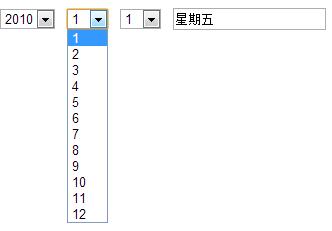
具体代码:
<html>
  <head>
    <meta http-equiv="Content-Type" content="text/html; charset=GB2312">
    <title>年月日星期级联</title>
  </head>

  <body topmargin="10" leftmargin="0">
    <form>
      <select id=year onchange="toDate();">
        <script>for(i=1970;i<=2010;i++)document.write("<option>"+i+"</option>")</script>
      </select>
      <select id=month onchange="toDate();">
        <script>for(i=1;i<=12;i++)document.write("<option>"+i+"</option>")</script>
      </select>
      <select id=day onchange="toDay();"></select>
      <input name=weekday>
    </form>
    <script type="text/javascript">
      var arr="日一二三四五六".split("")
      function toDate(){
        with(document.all){
          vYear=parseInt(year.options[year.selectedIndex].text)
          vMonth=parseInt(month.options[month.selectedIndex].text)
          day.length=0;
          for(i=0;i<(new Date(vYear,vMonth,0)).getDate();i++){day.options[day.length++].value=day.length;day.options[day.length-1].text=day.length;}
        }
        toDay();
      }
      function toDay(){
        vDay=parseInt(document.all.day.options[document.all.day.selectedIndex].value)
        document.all("weekday").value="星期"+arr[new Date(vYear,vMonth-1,vDay).getDay()]
      }
      window.onload=toDate;
    </script>
  </body>
</html>
希望本文所述对大家学习javascript程序设计有所帮助。
javascript实现倒计时跳转页面
很多网页都有类似的效果,那就是经过指定的时间能够跳转到其他页面,如果再人性化一点话,会带有倒计时效果,本章节就介绍一下如何实现此效果
轻松实现js图片预览功能
本文实例讲述了js实现图片预览的方法,自己以前写的一个,代码比较简洁,分享给大家供大家参考。具体如下:一、效果预览效果图:二、实现代码:
基于JavaScript实现鼠标悬浮弹出跟随鼠标移动的带箭头的信息层
很多网站,当鼠标悬浮在一个元素上的时候能够弹出一个信息说明层,并且此层能够跟随鼠标移动,同时弹出的层带有箭头,此箭头指向鼠标悬浮的元