
JavaScript+html5 canvas制作的圆中圆效果实例
本文实例讲述了JavaScript+html5 canvas制作的圆中圆效果。分享给大家供大家参考,具体如下:
运行效果截图如下:
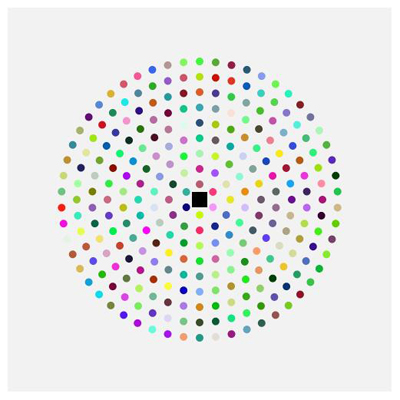
具体代码如下:
<!DOCTYPE html>
<html>
 <head>
  <title>demo</title>
  <style type="text/css">
   #canvas {
    background:#F2F2F2; height:500px; height:500px; margin-top:100px; margin-left:200px;
   }
  </style>
 </head>
 <body>
  <canvas id="canvas" width="500px" height="500px" ></canvas>
 </body>
 <script type="text/javascript">
  (function() {
    var dyl = {};
    dyl.getDom = function(id) {
        return document.getElementById(id);
    }
    dyl.getContext = function(canvasID) {
        var canvas = this.getDom(canvasID);
        if(!canvas) {
            return null;
        }
        return canvas.getContext("2d");
    }
    if(!window.dyl) {
        window.dyl = dyl;
    }
  })();
  cache = {};
  cache.context = dyl.getContext('canvas');
  // 每个圈的圆个数控制
  cache.scaleNmb = 6;
  cache.createColor = function() {
   var color = "rgb(";
   color += Math.round(Math.random()*255);
   color += ",";
   color += Math.round(Math.random()*255);
   color += ",";
   color += Math.round(Math.random()*255);
   color += ")";
   return color;
  };
  cache.draw = function() {
   cache.context.fillRect(-10, -10, 20, 20);
   for(var i=1; i<10; i++) {
    cache.context.save();
    for(var j=0; j<cache.scaleNmb*i; j++) {
     cache.context.rotate(Math.PI*2/(cache.scaleNmb*i));
     cache.context.fillStyle = cache.createColor();
     cache.context.beginPath();
     cache.context.arc(0, 20*i, 5, 0,Math.PI*2, true);
     cache.context.closePath();
     cache.context.fill();
    }
    cache.context.restore();
   }
  };
  cache.init = function() {
   cache.context.translate(250, 250);
   cache.draw();
  };
  cache.init();
 </script>
</html>
更多关于js特效相关内容感兴趣的读者可查看本站专题:《jQuery动画与特效用法总结》、《jQuery常见经典特效汇总》及《JavaScript动画特效与技巧汇总》
希望本文所述对大家JavaScript程序设计有所帮助。
js实现简单排列组合的方法
本文实例讲述了js实现简单排列组合的方法。分享给大家供大家参考,具体如下:运行效果截图如下:具体代码如下:!DOCTYPEhtmlhtmlheadtitledemo/titlescripttype
基于JavaScript实现瀑布流效果(循环渐近)
1.建立Html模版想法是先用一个divcontainer承载所有内容,然后divbox用来放置图片,最后divbox_border来当图片框,代码如下!DOCTYPEhtmlhtmlheadmetacharset="UTF-8"title瀑布
JavaScript下的时间格式处理函数Date.prototype.format
实例一:一个全的js时间处理函数,虽然我没有仔细去研究里面的正则,但是我经过了测试,是非常好用的,你可以根据你自己的需求设置想要的时间格