nodejs搭建本地http服务器教程

由于不做php相关的东西,懒得装apache,干脆利用nodejs搭建一个本地的服务器用于测试。
nodejs这玩意儿吧,对做前端的介入后端简直就是一把利器。而且目前,nodejs也越来越有商用价值。
nodejs其实是非常底层的,从功能上说,它既是apache也是php。像搭建http服务器这种功能,本来是apache已经封装好的,但nodejs需要我们手动来搭建。其实在实际应用中,我们可以使用现成的框架。但这里,我想手动搭建,也加深一下对http服务器的理解。
我们node执行下面这个文件,我命名为http.js,它将创建一个httpServer并监听3000端口。
var PORT = 3000;

var http = require('http');
var url=require('url');
var fs=require('fs');
var mine=require('./mine').types;
var path=require('path');

var server = http.createServer(function (request, response) {
  var pathname = url.parse(request.url).pathname;
  var realPath = path.join("assets", pathname);
  //console.log(realPath);
  var ext = path.extname(realPath);
  ext = ext ? ext.slice(1) : 'unknown';
  fs.exists(realPath, function (exists) {
    if (!exists) {
      response.writeHead(404, {
        'Content-Type': 'text/plain'
      });

      response.write("This request URL " + pathname + " was not found on this server.");
      response.end();
    } else {
      fs.readFile(realPath, "binary", function (err, file) {
        if (err) {
          response.writeHead(500, {
            'Content-Type': 'text/plain'
          });
          response.end(err);
        } else {
          var contentType = mine[ext] || "text/plain";
          response.writeHead(200, {
            'Content-Type': contentType
          });
          response.write(file, "binary");
          response.end();
        }
      });
    }
  });
});
server.listen(PORT);
console.log("Server runing at port: " + PORT + ".");
上面我们还引入了一个mine.js,这是我自己写的,里面存储的是名值对,用于定义不同后缀的文件所对应的返回方式:
exports.types = {
 "css": "text/css",
 "gif": "image/gif",
 "html": "text/html",
 "ico": "image/x-icon",
 "jpeg": "image/jpeg",
 "jpg": "image/jpeg",
 "js": "text/javascript",
 "json": "application/json",
 "pdf": "application/pdf",
 "png": "image/png",
 "svg": "image/svg+xml",
 "swf": "application/x-shockwave-flash",
 "tiff": "image/tiff",
 "txt": "text/plain",
 "wav": "audio/x-wav",
 "wma": "audio/x-ms-wma",
 "wmv": "video/x-ms-wmv",
 "xml": "text/xml"
};
fs模块是用于读取文件的,提供读取文件的方法,其实仔细研究文档会发现,它有同步和异步两种读取方式。fs.exists这个方法网上很多文章写作path.exists,,现在推荐写作fs.exists这个方法。否则会报警:
需要注意的是,不仅浏览器访问html文件会形成一次访问,里面链接的js,css等外部文件也会分别形成一次http访问。所以,http.createServer的回调其实是在一次页面访问中执行了多次的。我们console.log(realPath)一下就可以看到:
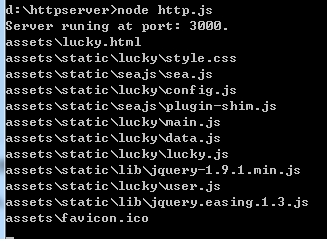
这里并没有加入默认访问index.html的功能,所以访问地址要写全http://127.0.0.1:3000/index.html
以上就是本文的全部内容,希望对大家的学习有所帮助,也希望大家多多支持积木网。
深入理解Node.js中的进程管理
前言本文主要对Node.js中进程管理相关的东西做一个简单介绍,包括process对象、child_process模块和cluster模块,详细的API可以查看官方文档,下面来看看详
node.js爬虫爬取拉勾网职位信息
简介用node.js写了一个简单的小爬虫,用来爬取拉勾网上的招聘信息,共爬取了北京、上海、广州、深圳、杭州、西安、成都7个城市的数据,分别以前端
Node.js 中exports 和 module.exports 的区别
Node.js中exports和module.exports的区别require用来加载代码,而exports和module.exports则用来导出代码。但很多新手可能会迷惑于exports和module.exports的区别,为了更
扫码添加企业微信,预约演示。